SOFTWARE

Phần mềm và các vấn đề liên quan

HARDWARE

Cập nhật driver , những kiến thức về phần cứng

EBOOKS

Những cuốn sách hay , tài liệu tham khảo

GAMES

Game và thông tin về game

VIDEO

Những bộ phim , video hay được cập nhật

MUSIC

Thế giới âm nhạc

GRAPHIC

Đồ họa cơ bản đến nâng cao

MOBILE - PDA

Thế giới di động và các tiện ích

Showing posts with label System tools. Show all posts

Wednesday, November 28, 2012

Chăm sóc PC toàn diện bằng công cụ TuneUp Utilities 2013 v13.0.2020.14 Final Full


   TuneUp Utilities 2013 cung cấp cho người dùng 30 công cụ khác nhau để tối ưu hóa và duy trì pin trên máy tính xách tay (MTXT) Windows, tăng thời lượng hoạt động được lâu hơn.
Cải tiến gần đây là sự tập trong vào lĩnh vực tối ưu hóa cho việc di chuyển của MTXT. Chế độ TuneUp Economy đảm bảo rằng MTXT của người dùng có được thời lượng pin tốt nhất có thể. Trên một máy tính để bàn, người dùng có thể sử dụng TuneUp Economy để giảm điện năng tiêu thụ và do đó, hóa đơn tiền điện sẽ giảm và dĩ nhiên lượng khí thải carbon ra môi trường cũng được giảm theo.
Tính năng này hoạt động bằng cách làm giảm hiệu suất xử lý máy tính trong các nhiệm vụ cơ bản, tắt bất kỳ chương trình nào có dấu hiệu tiêu hao năng lượng và giảm sức mạnh của điện năng gửi đến thiết bị kết nối khi chế độ được kích hoạt.
Một tính năng mới khác là TuneUp Program Deactivator, cho phép xác định các chương trình nền không cần thiết làm chậm máy tính của người dùng. Trong quá khứ, bạn cần phải quyết định những gì không cần thiết để vô hiệu hóa nhằm đạt được hiệu suất làm việc tốt nhất, nhưng giờ đây, chương trình cung cấp một chế độ hoàn toàn tự động, TuneUp Program Deactivator.
Các tiện ích khác đảm bảo hiệu suất làm việc luôn đạt hiệu quả hàng đầu, bao gồm một trình chống phân mảnh đĩa cứng được tích hợp bên trong để đảm bảo dữ liệu không bị phân mảnh làm chậm hệ thống. Tính năng Turbo Mode cung cấp sức mạnh Windows hoạt động nhanh hơn. Người dùng cũng có thể sử dụng tiện ích TuneUp Startup Manager có sẵn để loại bỏ các chương trình khởi động không cần thiết và tối ưu hoá StartUp để cải thiện tốc độ khởi động và tắt máy được nhanh hơn.
Không chỉ hướng về hiệu suất làm việc, TuneUp Utilities còn bao gồm một tiện ích phục hồi để phục hồi các tập tin vô tình bị xóa và một công cụ xóa an toàn để đảm bảo rằng các tập tin nhạy cảm có thể được xoá hoàn toàn.
Ngoài ra, phiên bản mới này còn có các công cụ phân tích, báo cáo, kiểm tra phần cứng và phần mềm trên máy tính cũng như bổ sung thêm một vài tiện ích cá nhân hấp dẫn khác.
Các tính năng mới trong TuneUp Utilities 2013


Với TuneUp Utilities 2013, bạn có thể chắc chắn rằng đây là sản phẩm tốt nhất cho "sức khỏe" của máy tính hay máy tính xách tay hoặc netbook - Với tất cả các tính năng cần thiết mà không có sự bất kỳ nâng cấp đắt đỏ! Dưới đây là một tổng quan về các tính năng mới quan trọng nhất trong phiên bản này:
TuneUp Disk Cleaner linh động hơn
Các tập tin chương trình tích lũy trên đĩa cứng của bạn còn sót lại không? TuneUp với chức năng Disk Cleaner cung cấp cho bạn tính năng quét dọn những tàn dư đó.
TuneUp Browser Cleaner dọn dẹp kỹ lưỡng trình duyệt
TuneUp Cleaner Browser cho phép bạn phát hiện ra và dọn dẹp rất nhiều dấu vết của các hoạt động lướt web của bạn, bao gồm cả lịch sử, bộ nhớ cache, cookie, và lịch sử download.
Tăng cường khả năng quét dọn của TuneUp Registry Cleaner
Với phiên bản 2013 TuneUp Registry Cleaner mới và cải tiến đáng kể, quét dọn kỹ hơn, bây giờ bạn có thể quét và dọn dẹp nhiều khu vực hơn trong Windows registry.
Chức năng TuneUp Shortcut Cleaner được cải thiện đáng kể
TuneUp Shortcut Cleaner tối ưu dành cho việc loại bỏ các phím tắt bị hỏng và danh sách lịch sử của chương trình từ đĩa cứng hiệu quả hơn trước rất nhiều.
Nâng cấp tính năng TuneUp Live Optimization giúp bạn tối ưu hóa hiệu quả.
TuneUp Live Optimization thông minh hơn, nó sẽ phát hiện những chương trình thường xuyên gây nên hiện tượng deprioritized và cung cấp cho bạn các tùy chọn để vô hiệu hóa chúng.
Hỗ trợ Windows 8
Điểm đặc biệt của phiên bản 2013 đã hoàn toàn tương thích với Microsoft Windows 8

LINK DOWNLOAD : https://www.kleii.com/f/5091448b47700ad372000479 

Thursday, November 22, 2012

Download nero for windows


Nero is a software suite with a large range of tools, among the many different features it is most commonly used to burn/write data to CDs, ripping date from audio CDs & DVDs and data back-up. It comes with an attractive interface that is easy to use and other features include an audio and video converter, audio track editing and mixing, cover designing and creating professional video or photo slide shows.

Among the many versions of Nero to be released the stand out version was version 5.0+ as it came with a major update that supported video encoders, wave editor and cover design programs, better audio plug-ins, application program interface and tool kit. It was also the first version to support DVD burning and supported Windows XP. Nero 7 came out with support for blue-ray disc support and was designed to run on Windows Vista but there were subsequent bug fix updates after its release and its final update made it compatible with Windows 7. Among later releases Nero came with the inclusion of data back-up tool, ability to digitalize tapes and records, data ripping and perfected the UI.

Version 5.5.10 is the last to support Windows 95, prior versions are still functional. Nero versions 6 to 7.2.7.0 require Windows 98 or later to work, 7.2.7.0 is the last version to support Windows NT 4.0. Versions 7.5.7.0 to 8.3.20.0 are compatible with Windows 2000/XP/Vista. Version 9 or later is compatible with Windows XP/Vista/7.

There are reports the v.8.3.13.0 release is compatible with Windows 7 even though officially they are not compatible and users are advised it can be problematic. Some users have experienced no problems at all. Older versions of Nero are still functional with their respective OS however are not supported by Nero.
Most stable versions are 6 and 7; they are not so bloated with unwanted features, install quickly and are easier to use. Version 10 of Nero has been reported as the most stable version for Windows 7.

Pros: Complete software suite for all your needs, attractive interface, simple to use.
Cons: Newer version extremely bloated, very long installation process, heavy on PC resources.

 Link download Nero Ultra Edition 7.10.1.0 (173.57 MB) : http://www.oldversion.com/download-Nero-Ultra-Edition-7.10.1.0.html

Wednesday, December 21, 2011

TuneUp Utilities 2012 v12.0.2160.13 Final Incl Keygen


TuneUp Utilities 2012 v12.0.2160.13 Final Incl Keygen - TuneUp Utilities2012 can quickly make your Windows operating system faster, easier to use, and more secure. And all operations performed on the operating system are completely safe, because all changes are monitored by TuneUp Rescue Center and can be undone at any time. All TuneUp Utilities modules can be accessed through a common interface that is divided into six categories. In addition, the main window also has three general buttons in a dark gray bar to the right at the top of the window. Pressing the first button starts the TuneUp Rescue Center module. The second button starts the TuneUp Update Wizard, which can be used to updateTuneUp Utilities 2009 to the latest version over the Internet. The last button provides help and settings that you can use to customize the software package to meet your needs.

TuneUp Utilities 2012 v12.0.2160.13 Final Incl Keygen
The new Start page
TuneUp Utilities 2012 welcomes you with a completely redesigned Start page, which tells you about the status of your computer. If problems or nonoptimal settings are found, you are only a mouse-click away from resolving them. The Start page also tells you when new tips for increasing computer performance are available and warns you if maintenance tasks are not being taken care of automatically. The Start page also shows you whether new automatic startup programs have been added to Windows since the last time you ran TuneUp Utilities. You can decide whether these programs that start up automatically are really necessary.

TuneUp Speed Optimizer
Which settings slow your computer down? Which unnecessary services or programs are running in the background? Is your Internet connection optimally configured? TuneUp Speed Optimizer knows the answers to all these questions. It examines your entire system for bottlenecks, superfluous background programs, and incorrect settings. Great: with just one click you can carry out most optimizations very quickly. In addition, TuneUp Speed Optimizer provides suggestions for speeding up your system.

TuneUp Shortcut Cleaner
Cleaning up your working environment is tedious: removing invalid shortcuts from the Start menu, the Desktop, and the Quick Launch bar is very time-consuming. TuneUp ShortCut Cleaner now does the work for you. It checks whether all shortcuts are valid and removes the orphaned ones with just a click of a button. At the same time, empty folders are removed from the Start menu. TuneUp ShortCut Cleaner also checks frequently used programs and cleans up the list of recently opened files.

Support for the Opera browser
After hard disk defragmentation, which we introduced in TuneUp Utilities 2009, the feature most requested by customers was support for the Opera browser. TuneUp Utilities 2010 now also includes full support for Opera. Via several special Opera settings, TuneUp System Control now allows you to change the number of Speed Dial entries, conveniently choose your default search engine, and reenable fast backward and forward navigation. Internet optimization lets you optimize Opera's performance for your Internet connection. Free up disk space lets you delete the Opera cache.

TuneUp Styler
Now you can also change the Vista logo animation which appears just before logon. You can download a whole series of great animations from the TuneUp website. Or, if you prefer, you can choose your own personal image to display while Vista starts up. With Vista, you can also add your own images to Vista's logon screen: With just a few mouse clicks you can create a truly personal logon experience.

TuneUp Uninstall Manager
Redesigned from the ground up, TuneUp Install Manager now runs much faster and has a new, even more intuitive interface so that it is even easier to uninstall unnecessary programs. Unnecessary programs often are forgotten because they were installed a long time ago and then not used. TuneUp Utilities 2009 shows you a list of programs not used for a long time so that you can target for uninstallation those applications that use valuable disk space and in certain circumstances even slow your system down.

TuneUp StartUp Manager
A smooth-running system results when there are no unnecessary autostart applications. The improved TuneUp Startup Manager organizes your programs into groups and provides clear explanations to make it easier for you to identify those programs that are not needed.New automatic startup programs are now highlighted so that you can disable unwanted entries more easily. System start tasks are now also listed in TuneUp StartUp Manager In Vista, in particular, scheduled tasks are used in place of autostart entries.
TuneUp Utilities 2012 v12.0.2160.13 Final Incl Keygen 
Download : | FileSonic | Bulletupload | Filepost 

Thursday, December 15, 2011

MF | Animated Christmas Tree for Desktop - 2012


Add a fresh touch to your desktop with Christmas tree. It can optionally stay on top and you can adjust transparency - a mouseover hint reveals how many days are left till Christmas.

Cây thông noel cho desktop | 9.52 MB | 28 files


DOWNLOAD

Wednesday, November 23, 2011

DriverScanner 2012 v4.0.3.4 | CD Key


DriverScanner là một trong các bộ sản phẩm chủ lực của nhà sản xuất phần mềm Uniblue, nó có giá thương mại là $29.95, công cụ giúp hệ thống luôn trong tình trạng hoạt động hiệu quả nhất bằng cách quét kiểm tra các trình điều khiển (Dirvers) quan trọng của hệ thống và cập nhật, cài đặt các phiên bản mới nhất nếu có sẵn.
 
 
Hôm nay, tác giả giới thiệu về bộ công cụ hữu dụng này và kèm theo 10 mã kích hoạt gửi tặng để bạn có thể tải về kích hoạt cho công cụ....


Nhà sản xuất : Uniblue Systems
Giấy phép : Miễn phí từ Uniblue
Dung lượng : 5.57Mb/Windows XP/Vista/7


DriverScanner 2012 có giao diện đồ họa rất thân thiện và rất dễ sử dụng, giúp bạn có thể cập nhật phiên bản mới nhất cho các trình điều khiển (Drivers) một cách nhanh chóng với vài cái nhấp chuột đơn giản.


Sau khi cài đặt công cụ sẽ tự động quét kiểm tra các trình điều khiển (Drivers) trên máy tính và thông báo kết quả. Nếu các trình điều khiển quá cũ công cụ sẽ hiển thị thông tin chi tiết của từng trình điều khiển và yêu cầu cập nhật > Register now >  nhập một trong các mã kích hoạt tác giả gửi tặng kèm bên dưới nhập vào ô trống tại cửa sổ RegistryDriverScanner > Activate now. Do tác giả đã kích hoạt từ trước và quên chụp lại màn hình nên mượn hình ảnh của softpedia để làm minh họa.


Tại giao diện của DriverScanner có 4 Overview, Driver scan, Manage và Settings.

Overview :  Hiển thị thông tin tổng thể của công cụ, bạn có thể nhấn Start scan để kiểm tra các trình điều khiển cũng như cập nhật các phiên bản mới nhất từ Internet nếu có sẵn.

Driver scan : có 3 tính năng  Diver scan, Scan results và Update drivers 

* Diver scan : Cho phép bạn thực hiện kiểm tra các trình điều khiển bằng cách nhấn Start scan và cập nhật các phiên bản mới nhất đang có sẵn nếu phát hiện trình điều hệ thống của bạn quá cũ.


* Scan results : Hiển thị thông tin chi tiết kết quả các lượt quét kiểm tra hệ thống.
* Update drivers : Thông tin chi tiết về phiên bản cập nhật cho các trình điều khiển trên hệ thống.

Trên hệ thống của tác giả các trình điều khiển đã được Windows cập nhật đầy đủ nên không có thông tin về các trình điều khiển, bạn hãy kiểm nghiệm sự hữu dụng của DriverScanner trên hệ thống máy tính cá nhân.

Manage : Có 3 tính năng Download history, Ignored drivers và Restore.


* Download history : Hiển thị vị trí lưu các phiên bản cập nhật đã được thực hiện tại "C:/Users/......../AppData/Roaming/Uniblue/DriverScanner/drivers" để xem các thông tin này bạn phải thực hiện vài động tác để hiển thị các file đã được Windows ẩn đi.
* Ignored drivers : Hiển thị thông tin các trình điều khiển mà bạn bỏ qua không cập nhật trong các lượt quét vì thấy không cần thiết với nhu cầu sử dụng cá nhân.
* Restore : Cho phép bạn tạo bản sao của các trình điều khiển (Drivers) trước khi thực hiện cập nhật các phiên bản mới để có thể khôi phục lại hoạt động của hệ thống như trước khi thực hiện cài đặt phiên bản mới cho các trình điều khiển khi xảy ra các sự cố không mong muốn.

Settings : Có 5 tính năng General settings, Scan Settings, Download settings, Proxy settings và System information

* General settings : Cho phép chọn lựa cách hiển thị của công cụ và thay đổi ngôn ngữ 


* Scan Settings : Cho phép thiết lập sự hoạt động của công cụ khởi động cùng Windows, tự động quét kiểm tra hệ thống khi được kích hoạt, tác giả khuyên bạn hãy vô hiệu hóa 2 tính năng này để tránh bị làm phiền khi vừa khởi động máy tính. Ngoài ra công cụ cũng cho phép bạn thiết lập thời gian thực hiện quét kiểm tra hệ thống hàng ngày, mỗi tuần hoặc mỗi tháng tại tính năng Scheduler.
* Download settings : Cho phép bạn thực hiện thay đổi vị trí lưu các bản cập nhật phiên bản mới của trình điều khiển tại một vị trí khác trên ổ dĩa bằng cách nhấn Browser... tìm tới vị trí muốn lưu trữ chọn nó > Apply. Tính năng còn cho phép bạn thiết lập số lượng các bản cập nhật tải về tối đa là 5 trong một lượt thực hiện tạiMaximum number of simultaneous driver download.
* Proxy settings : cho phép thiết lập giao thức kết nối Internet khi thực hiện tải các bản cập nhật thông qua các trang Proxy.
* System information : Hiển thị thông tin phần cứng của hệ thống máy tính.

Để sở hữu DriverScanner 2012 bạn hãy tải một trong các mã kích hoạt bên dưới về sử dụng cho nhu cầu cá nhân, các mã kích hoạt được tác giả thực hiện trên Notepad và nén với Winrar.


DOWNLOAD


Monday, November 21, 2011

WinZip 16.0 Build 9686

WinZip 16.0 Build 9686 - WinZip brings the convenience of Windows to the use of ZIP files and other archive and compression formats. The optional wizard interface makes unzipping easier than ever. WinZip features built-in support CAB files and for popular Internet file formats such as TAR, gzip, UUencode, BinHex, and MIME. ARJ, LZH, and ARC files are supported via external programs. WinZip interfaces with most virus scanners.
 
Licence: Shareware.
WinZip 16.0 Build 9686

Official site | Download: WinZip 16.0 Build 9686 (13.9 MB)

Wednesday, November 16, 2011

Windows 7 Sounds for XP


Windows 7 Sounds for XP
==================
v.1.01 (17 October 2010
- improved folder path naming, changed absolute paths to relative in .reg file
v.1.0 (11 October 2010) - initial release

The original Windows 7 sound schemes adapted for Windows XP.

Windows 7 Default, Afternoon, Calligraphy, Characters, Cityscape, Delta,
Festival, Garden, Heritage, Landscape, Quirky, Raga, Savanna, Sonata

. 303 WAV files
. 3 MID files

To install.
1 Copy the "Windows 7" folder and contents as a subfoler of \windows\media
i.e. \windows\media\Windows 7\
2. Double-click the win7sounds.reg file to merge with the Windows Registry
When asked "Are you sure you want to add the information..." choose "Yes"
3. Open the Sounds and Audio Devices control applet in Contol Panel
Start\Control Panel\Sounds and Audio Devices
4. Click on the "Sounds" tab
5. Choose one of the Windows 7 schemes in the "Sound scheme" drop-down list
Choose to save your existing sound scheme if required
6. Click OK

To uninstall.
1. Open the Sounds and Audio Devices control applet in Contol Panel
Start\Control Panel\Sounds and Audio Devices
2. Select the "Sounds" tab
3. Choose the relevant Windows 7 sound scheme in the "Sound scheme" drop-down list
4. Select Delete to delete the sound scheme (note, this only deletes the scheme list not the files).
5. To delete the sound files if desired, delete the \windows\media\Windows 7\ folder.

Note:
Speech recognition sound files are included but must be activated manually.

DOWNLOAD | 7.60 MB

Friday, November 11, 2011

Wireshark 1.7.0 Final

Wireshark 1.7.0 Final - Wireshark (formerly Ethereal) is a network protocol analyzer for Unix andWindows. It allows you to examine data from a live network or from a capture file on disk. You can interactively browse the capture data, viewing summary and detail information for each packet. Has several powerful features, including a rich display filter language and the ability to view the reconstructed stream of a TCP session.
Licence: GPL.
Wireshark 1.7.0 Final

Wednesday, October 12, 2011

UltraISO PE 9.5.0.2800

UltraISO PE 9.5.0.2800 - UltraISO can extract, create, edit, and convert CD/DVD image files. It can directly edit an ISO file, make images from CD/DVD-ROMs, or create a new one from files and folders on your computer. In addition, UltraISO can convert nearly all known CD and DVD image formats to ISO, BIN/CUE, Nero (NRG), Alcohol 120% (MDS/MDF) and CloneCD (CCD/IMG/SUB) formats, as well as burn CD/DVD images directly through Nero Burning ROM or Microsoft cdburn/dvdburn utility. UltraISO can be used as an universal CD/DVD image (including ISO and BIN) extractor, creator, editor, and converter with most CD/DVD-burning software and virtual CD/DVD drive software.

  
Licence: Shareware.
UltraISO PE 9.5.0.2800

Official site Download: UltraISO PE 9.5.0.2800 (3.12 MB)

Tuesday, September 13, 2011

DirectX 11 | Windows XP and Vista

   Chương trình thông qua một thư viện để tăng thêm tính tương thích với các trò chơi và chương trình. Đã sửa lỗi với các game khi chạy yêu cầu DirectX 10.1 và 11. Cho phép bạn chạy game nhưng trong chạy một chương trình ( nếu bạn có đồ họa không hỗ trợ DX 10.1 và 11) và phần cứng (Card màn hình tương thích với DX 10.14 và 11) giả lập DirectX11


DOWNLOAD


http://oron.com/6dlqzak77k0z

Password Manager XP 3.0.548

Password Manager XP 3.0.548 - Password Manager XP will help you protect any secret information that is stored on your PC. This tool is a passwords and secrets keeper. You will forget all your headachesabout losses of passwords, access codes, bank accounts, and other important information. No more "I forgot my password!" and "Can't remember my account code!"  

Licence: Shareware.
Password Manager XP 3.0.548

Official site
Download: Password Manager XP 3.0.548 (1.97 MB)


Friday, September 9, 2011

Driver Checker V2.7.5 Datecode 08.09.2011 Incl Keygen

Driver Checker V2.7.5 Datecode 08.09.2011 Incl Keygen - New Manage Your Windows Drivers with Ease. Driver Checker allows you to easily detect and update the latest drivers for your entire hardware devices. It can also back up the existing drivers and restore the drivers in case that you needed to reinstall or upgrade your operating system.


Driver Checker provides an easy-to-use interface through which only a few clicks can make your jobs completely done with ease.

Key Features and Benefits of Driver Checker:

Starightfoward and intuitive interface
Better PC performance and improved stability
Access to the largest drivers database in the industry
Continous updates for the latest manufacturer drivers
Submit the unavailable drivers updated in next version
Unlimited technical supports with our 24x7 technicians
Automatically update and maintain these drivers: Printer Drivers, USB Drivers, Sound/Audio Drivers, Vista Drivers,Bluetooth Drivers, Mouse Drivers, Keyboard Drivers, RAID Drivers, Scanner Drivers, Video Drivers, Modem Drivers, Network Drivers, Linksys Drivers, Webcam Drivers, Graphic Drivers, VGA Drivers & Other Windows Drivers.
Download : | FileSonic | Easy-Share | Wupload 

Thursday, September 8, 2011

TuneUp Utilities 2011 10.0.4400.20

TuneUp Utilities 2011 10.0.4400.20 - TuneUp Utilities can make your Windows operating systemfaster, more comfortable and more secure with just a few mouse clicks. And all operations performed on the operating system are completely safe, because all changes are monitored by TuneUp Rescue Center and can be undone at any time. All TuneUp Utilities modules can be accessed through a common interface that is divided into six categories.

The software helps both beginners and experts to make Windows meet their needs in a way that is better, easier and safer. All important system options are explained in an easy way and can be turned on or off at the click of your mouse. TuneUp Utilities will then make the necessary changes in the registry or boot files automatically. We place a high value on system stability, so that Windows won't stop working reliably. And most changes that you make can be undone in TuneUp Rescue Center - easily and safely.

TuneUp Utilities automatically runs important maintenance tasks for you, makes you aware of any problems and offerssimple solutions. This ensures performance is always at its best. A slow and untidy computer is now a thing of the past for you. You can also use TuneUp Utilities to customize the appearance of your Windows system - to make working on your computer more enjoyable.

With TuneUp Utilities you will quickly make your Windows system faster and more convenient to use- and ensure that it stayslike this for the long term. This makes TuneUp Utilities the perfect program for everyone: for those who would rather leavethe computer maintenance to a reliable partner as well as for those who would rather do everything themselves.

The TuneUp Turbo Mode provides an immediate performance boost whenever you need it. When you use your computer in the TuneUp Turbo Mode, an analysis is performed to see which tasks, programs and functions are currently running in the background that are not strictly necessary. These programs are stopped or slowed down, allowing the additional processing power gained to be used exclusively by the programs you are actually running.  

License: Shareware.
TuneUp Utilities 2011 10.0.4400.20

Official site | Download: TuneUp Utilities 2011 10.0.4400.20 (20.4 MB)

Wednesday, September 7, 2011

Kaspersky kis/kav/Pure Keys (07 September 2011)


07 September 2011| Kaspersky kis/kav/Pure Keys[ALL IN ONE]


How to activate Kaspersky license using a key file :

1. Open Kaspersky License Manager (from lower right corner).

2. Click ‘Activate the application with a new license’ button. (Delete any trial key first, by clicking the red X next to the key).

3. Disable your internet connection (either disable Network adapter from control panel or turn off your modem/router).

4. Select ‘Activate commercial version’ and enter the activation license code as 11111-11111-11111-1111X
or select ‘Activate trial license’.

5. Click Next, an error dialog box will open as shown below:

6. Click Ok and you will now get the option to activate kaspersky using a key file.

7. Browse to the key location and activate kaspersky.

Try Kis11 or Kav11 Keys For KASPERSKY 2012 version.

DOWNLOAD HERE:


Code
http://www.filesonic.com/file/1881693451

Tuesday, September 6, 2011

Super Utilities Pro 9.9.58

Super Utilities Pro 9.9.58 - Super Utilities is a collection of tools to fix, speed up, maintain and protect your PC. These utilities include Disk Cleaner, Registry Cleaner, Uninstall Plus, StartUp Manager, Folder Guard, Tracks Washer, Driver Backup, Auto Shutdown, Windows Manager and Process Manager. With a cool and user-friendly interface makes it easy for anyone to use. You can get your system running at peak performance levels in few minutes with it. 
Licence: Shareware.
Super Utilities Pro 9.9.58
Official site | DownloadSuper Utilities Pro 9.9.58 (4.90 MB)

Sunday, September 4, 2011

Khôi phục file bị hỏng bằng File Repair


Đôi khi bạn vô tình lỡ tay xóa mất các file dữ liệu của mình, lúc này bạn cần phải dùng các phần mềm khôi phục dữ liệu để lấy lại các file này. Nhưng đa số những tập tin được khôi phục lại thường xuyên bị lỗi… Ngoài ra còn nhiều lí do khác có thể làm cho các tập tin này bị lỗi như là khi hệ thống máy tính tắt đột ngột, nhiễm virus, các lỗi ứng dụng hay các loại tương tự như vậy. Thật là phiền toái khi bạn cố gắng khôi phục các tập tin chứa dữ liệu quan trọng này nhưng đều bị thất bại.
File Repair là một ứng dụng mạnh mẽ có khả năng khôi phục các tập tin bị hỏng của một số định dạng như: MS Word, Excel, Access, Powerpoint, video, file âm thanh hoặc hình ảnh cũng như các file nén.
Các định dạng mà File Repair hỗ trợ phục hồi là: DOC, DOCX, DOCM, RTF, PDF, XLS, XLA, XLSX, ZIP, RAR, AVI, FLV, MP4, MOV, WMV, ASF, MPG, JPEG, GIF, TIFF, BMP, PNG, PPT, PPS, PPTX, MP3, WAV, MDB, MDE, ACCDB và ACCDE.
Chương trình có thể phục hồi được các tập tin khi:
Không thể đọc tập tin.
Tập tin không thể truy cập được.
Ứng dụng tương ứng không thể mở các loại tập tin này.
Lỗi trong bộ nhớ hoặc các tài nguyên hệ thống bị lỗi…
Bạn có thể tải phần mềm này tại đây hoặc tại đây.
Dung lượng của File Repair khá khiêm tốn (966KB) và miễn phí.
Chương trình có thể tương thích với Window XP, Vista, Window 7.
Đầu tiên bạn cần tải file cài đặt của chương trình về và tiến hành cài đặt nó vào máy tính. File Repair là một công cụ mạnh mẽ dùng để sữa chữa các tập tin bị lỗi của bạn. Điểm mạnh của File Repair là miễn phí, không có quảng cáo và không giới hạn tính năng hay thời gian khi sử dụng.
Tại giao diện chính của chương trình, mục Select the source file to be repaired bạn nhấn vào dấu “…” để chọn đến file cần sửa chữa. Bạn có thể chọn bất cứ định dạng nào mà chương trình hỗ trợ, các định dạng mà chương trình hỗ trợ được hiển thị phía bên dưới giao diện chính của File Repair. Nếu bạn muốn đổi nơi lưu tập tin sau khi sửa chữa thì bạn để ý vào dòng nhỏ có tên là Output fixed file as rồi nhấn vào nút Change để thay đổi nơi lưu trữ.
Sửa lỗi các tập tin bị hỏng ở bất kì định dạng nào, Thủ thuật - Tiện ích, Công nghệ thông tin, Sua loi tap tin, sua loi cac tap tin, tap tin, cong nghe, phan mem, file
Cuối cùng bạn nhấn Start Repair để chương trình bắt đầu thực hiện quá trình sữa lỗi, trong quá trình phục hồi sẽ có một tập tin log (báo cáo) xuất hiện hiển thị các thông tin liên quan đến quá trình phục hồi.
Sửa lỗi các tập tin bị hỏng ở bất kì định dạng nào, Thủ thuật - Tiện ích, Công nghệ thông tin, Sua loi tap tin, sua loi cac tap tin, tap tin, cong nghe, phan mem, file
Tuy nhiên có những trường hợp khôi phục các tập tin này không thành công thì sẽ có một thông điệp nhắc nhở bạn rằng bạn có thể đính kèm tập tin này và gửi nó đến email hỗ trợ này cho nhà phát triển phần mềm. Các chuyên gia của họ sẽ cố gắng sửa chữa nó và gửi nó lại cho bạn trong vòng 24 giờ sau đó.
Sửa lỗi các tập tin bị hỏng ở bất kì định dạng nào, Thủ thuật - Tiện ích, Công nghệ thông tin, Sua loi tap tin, sua loi cac tap tin, tap tin, cong nghe, phan mem, file

Friday, September 2, 2011

Lỗi khi ghost | Nguyên nhân ?


Hiện nay, ghost (sao lưu và phục hồi dữ liệu ổ cứng bằng chương trình Norton Ghost) là công việc được nhiều người thực hiện để sửa lỗi ổ đĩa cứng và Windows. Tuy nhiên, đôi lúc bạn không thể phục hồi từ file ghost (*.gho) vì chương trình báo lỗi và ngưng nửa chừng. Dưới đây là một số nguyên nhân có thể gây ra tình trạng này:

1/ Lỗi do chế độ nén
Khi tạo file ghost bạn có 3 chế độ nén là No (không nén), Fast (nén trung bình) và High (nén tối đa); Trong đó, mức High có thể gây ra lỗi khi bung file ghost. Vì thế khi ghost, bạn nên chọn chế độ Fast hoặc tốt nhất là chọn No nếu ổ cứng lưu file ghost của bạn còn dư dả nhiều.
2/ Lỗi do ổ đĩa cứng
Ổ cứng bị lỗi (thường là bị bad sectors) cũng là một nguyên nhân gây ra lỗi khi ghost. Do file ghost của bạn đã bị hư dữ liệu bên trong khiến cho chương trình không thể đọc tiếp được. Bạn thử copy một file ghost tốt từ một máy khác vào máy mình và bung thử xem sao, nếu vẫn không được nghĩa là ổ cứng bạn có vấn đề rồi đó. Bạn nên dùng một phần mềm chuyên dụng format cấp thấp ổ cứng để cách ly các bad sectors hoặc tốt nhất là thay ổ cứng khác.
3/ Đĩa khởi động không tương thích phần cứng trong máy
Hiện nay, rất nhiều thiết bị phần cứng mới ra đời khiến cho đĩa Hiren’s BootCD không còn tương thích với các mainboard đời mới. Thường lỗi tương thích sẽ xuất hiện với dòng thông báo “boot files not found” hoặc “loading failed”. Để khắc phục, bạn hãy tìm mua hoặc tải về phiên bản mới nhất của đĩa Hiren’s Boot (hiện tại là 9.6). Ngoài ra, có thể mắt đọc của ổ đĩa CD đã bị xuống cấp nên không đọc được đĩa CD hoặc đĩa CD kém chất lượng, bạn hãy thử thay thế đĩa CD hay ổ CD khác để xác định lỗi do đĩa hay do ổ đĩa.
4/ Lỗi do bộ nhớ RAM
Nếu khởi động bằng đĩa CD Hiren’s Boot rồi chạy ghost thì những dữ liệu cần thiết cho quá trình ghost của bạn sẽ được lưu trong bộ nhớ RAM. Nếu RAM của máy bạn bị lỗi thì ghost cũng sẽ gặp lỗi khi truy xuất RAM, lúc đó, tốt nhất là bạn nên thử thay RAM khác.

Tuesday, August 23, 2011

Run | Window + R


Acessibility Options
access.cpl

Add Hardware Wizard
hdwwiz.cpl

Add/Remove Programs
appwiz.cpl

Administrative Tools
control admintools

Automatic Updates
wuaucpl.cpl

Bluetooth Transfer Wizard
fsquirt

Calculator
calc

Certificate Manager
certmgr.msc

Character Map
charmap

Check Disk Utility
chkdsk

Clipboard Viewer
clipbrd

Command Prompt
cmd

Component Services
dcomcnfg

Computer Management
compmgmt.msc

Date and Time Properties
timedate.cpl

DDE Shares
ddeshare

Device Manager
devmgmt.msc

Direct X Control Panel (If Installed)*
directx.cpl

Direct X Troubleshooter
dxdiag

Disk Cleanup Utility
cleanmgr

Disk Defragment
dfrg.msc

Disk Management
diskmgmt.msc

Disk Partition Manager
diskpart

Display Properties
control desktop

Display Properties
desk.cpl

Display Properties (w/Appearance Tab Preselected)
control color

Dr. Watson System Troubleshooting Utility
drwtsn32

Driver Verifier Utility
verifier

Event Viewer
eventvwr.msc

File Signature Verification Tool
sigverif

Findfast
findfast.cpl

Folders Properties
control folders

Fonts
control fonts

Fonts Folder
fonts

Free Cell Card Game
freecell

Game Controllers
joy.cpl

Group Policy Editor (XP Prof)
gpedit.msc

Hearts Card Game
mshearts

Iexpress Wizard
iexpress

Indexing Service
ciadv.msc

Internet Properties
inetcpl.cpl

IP Configuration (Display Connection Configuration)
ipconfig /all

IP Configuration (Display DNS Cache Contents)
ipconfig /displaydns

IP Configuration (Delete DNS Cache Contents)
ipconfig /flushdns

IP Configuration (Release All Connections)
ipconfig /release

IP Configuration (Renew All Connections)
ipconfig /renew

IP Configuration (Refreshes DHCP & Re-Registers DNS)
ipconfig /registerdns

IP Configuration (Display DHCP Class ID)
ipconfig /showclassid

IP Configuration (Modifies DHCP Class ID)
ipconfig /setclassid

ava Control Panel (If Installed)
jpicpl32.cpl

Java Control Panel (If Installed)
javaws

Keyboard Properties
control keyboard

Local Security Settings
secpol.msc

Local Users and Groups
lusrmgr.msc

Logs You Out Of Windows
logoff

Microsoft Chat
winchat

Minesweeper Game
winmine

Mouse Properties
control mouse

Mouse Properties
main.cpl

Network Connections
control netconnections

Network Connections
ncpa.cpl

Network Setup Wizard
netsetup.cpl

Notepad
notepad

Nview Desktop Manager (If Installed)
nvtuicpl.cpl

Object Packager
packager

ODBC Data Source Administrator
odbccp32.cpl

On Screen Keyboard
osk

Opens AC3 Filter (If Installed)
ac3filter.cpl

Password Properties
password.cpl

Performance Monitor
perfmon.msc

Performance Monitor
perfmon

Phone and Modem Options
telephon.cpl

Power Configuration
powercfg.cpl

Printers and Faxes
control printers

Printers Folder
printers

Private Character Editor
eudcedit

Quicktime (If Installed)
QuickTime.cpl

Regional Settings
intl.cpl

Registry Editor
regedit

Registry Editor
regedit32

emote Desktop
mstsc

Removable Storage
ntmsmgr.msc

Removable Storage Operator Requests
ntmsoprq.msc

Resultant Set of Policy (XP Prof)
rsop.msc

Scanners and Cameras
sticpl.cpl

Scheduled Tasks
control schedtasks

Security Center
wscui.cpl

Services
services.msc

Shared Folders
fsmgmt.msc

Shuts Down Windows
shutdown

Sounds and Audio
mmsys.cpl

Spider Solitare Card Game
spider

SQL Client Configuration
cliconfg

System Configuration Editor
sysedit

System Configuration Utility
msconfig

System File Checker Utility (Scan Immediately)
sfc /scannow

System File Checker Utility (Scan Once At Next Boot)
sfc /scanonce

System File Checker Utility (Scan On Every Boot)
sfc /scanboot

System File Checker Utility (Return to Default Setting)
sfc /revert

System File Checker Utility (Purge File Cache)
sfc /purgecache

System File Checker Utility (Set Cache Size to size x)
sfc /cachesize=x

System Properties
sysdm.cpl

Task Manager
taskmgr

Telnet Client
telnet

User Account Management
nusrmgr.cpl

Utility Manager
utilman

Windows Firewall
firewall.cpl

Windows Magnifier
magnify

Windows Management Infrastructure
wmimgmt.msc

Windows System Security Tool
syskey

Windows Update Launches
wupdmgr

Windows XP Tour Wizard
tourstart

Wordpad
write or wordpad

Monday, June 20, 2011

Thu gọn thanh Taskbar trên Windows 7

Để tiện sử dụng các chương trình trong Windows 7, ta thường thêm ứng dụng thường hay sử dụng vào vị trí của thanh Taskbar để dễ truy cập. Nhưng đối với những người sử dụng nhiều chương trình thì vị trị của thanh Taskbar có thể đáp ứng đủ không? Đối với Windows 7, khi bạn “PIN” 1 ứng dụng vào thanh Taskbar thì được bao nhiêu chương trình? Có thể từ khoảng 14 – 20 ứng dụng bạn có thể “Pin” vào thanh Taskbar (cũng tùy thuộc vào chuẩn màn hình sử dụng).
Và khi đó, bạn sẽ thấy rối tung lên vì các icon này trên thanh Taskbar. Và bây giờ, bạn có thể nhờ cậy đến tiện ích nhỏ “BINS”, nó sẽ giúp bạn thu gọn các icon trên thanh Taskbar. Việc sắp xếp là do bạn lựa chọn, bạn sẽ nhóm các ứng dụng chung vào 1 biểu tượng nào đó 1 cách nhanh chóng.
Dễ dàng tại nhóm các phím tắt thông qua tiện ích này, bạn chỉ cần kéo và thả biểu tượng lên trên đầu của 1 biểu tượng khác và thả vào bảng popup xuất hiện. Bạn có thể tùy biến nó, di chuyển đến nơi nào bạn muốn, có thể chèn nhiều biểu tượng vào chung 1 biểu tượng làm chính…để quay ngược lại thì ta kéo thả quay trở lại thanh Taskbar tại vị trí trống, hoặc muốn gỡ bỏ khỏi thanh Taskbar thì ta bấm chuột phải vào biểu tượng đó và chọn “Inpin this program from Bin”.
Để xem ứng dụng, ta chỉ cần chi chuyển chuột đến vị trí của các ứng dụng đã ghim chung vào nhau và sử dụng.
Phiên bản hiện tại hoàn toàn miễn phí, bạn có thể tải về và sử dụng tại đây: Click Here.

Sunday, May 22, 2011

6 thủ thuật Registry đơn giản để tăng tốc hệ thống Windows

Nhiều người thường nói khá nhiều đến thành phần Registry trong Windows và các thủ thuật, nhưng liệu chúng ta có hiểu được chính xác những gì thuộc về Registry hay không? Hiểu theo cách nôm na rằng, Windows Registry là 1 hệ cơ sở dữ liệu của hệ điều hành, bên trong đó có chứa toàn bộ các thông tin cấu hình và tùy chỉnh của hệ thống, và có liên quan chặt chẽ đến toàn bộ phần mềm bên trong, từ những phần nhỏ nhất, ví dụ như thời gian bạn di chuyển chuột qua từng biểu tượng trên Taskbar đến chế độ Preview pop – up (trong Windows Vista và 7) trong quá trình cải thiện hiệu suất của hệ điều hành.
Sau nhiều cải tiến, phiên bản Windows Vista và 7 đã được tích hợp nhiều chức năng tiện dụng hơn, và số lượng thủ thuật có thể áp dụng với Registry cũng nhiều hơn. Và nguyên tắc cơ bản mỗi khi làm việc với Registry là thao tác sao lưu để đề phòng trường hợp rủi ro. Các bạn có thể thực hiện theo cách thủ công hoặc sử dụng phần mềm hỗ trợ, ví dụ điển hình là phần mềm ERUNT - rất đơn giản, dễ sử dụng, tương thích tốt với nhiều phiên bản Windows. Trong phần tiếp theo của bài viết, chúng tôi sẽ giới thiệu với các bạn 6 thủ thuật với Registry để cải thiện hiệu suất của Windows.

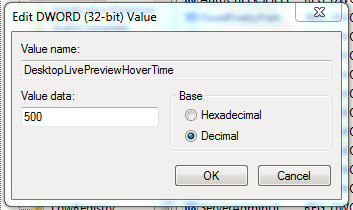
1. Tăng tốc Aero Peek:

Chế độ Aero Peek của Windows 7 cho phép người sử dụng xem toàn bộ Desktop khi di chuột qua nút Show Desktop ở phía cuối khay hệ thống. Khoảng thời gian trễ mặc định của chế độ này là 500 millisecond, tương ứng với ½ giây. Trước tiên, các bạn mở Registry Editor và tìm tới khóa:
HKEY_CURRENT_USER > Software > Microsoft > Windows > CurrentVersion > Explorer > Advanced
Tại phần cửa sổ bên phải, nhấn chuột phải và chọn New > DWORD (32-bit), đặt tên cho khóa này là DesktopLivePreviewHoverTime. Kích đúp để mở khóa này, dưới mục Base chúng ta chọn Decimal và điền khoảng thời gian trễ lớn hơn hoặc nhỏ hơn giá trị mặc định:

2. Tăng tốc Taskbar Previews:

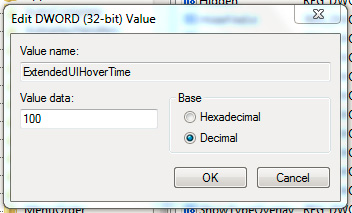
Khi chúng ta di chuột qua các biểu tượng dưới thanh Taskbar trong Windows Vista hoặc 7, hệ thống sẽ hiển thị 1 cửa sổ Preview nho nhỏ. Khoảng thời gian delay chuẩn của chế độ này là 400 millisecond, nghĩa là nhanh hơn ½ giây. Nếu khoảnh khắc này quá nhanh hoặc chậm đối với bạn, hãy thay đổi lại qua Registry. Mở Registry Editor và di chuyển tới đường dẫn:
HKEY_CURRENT_USER > Software > Microsoft > Windows > CurrentVersion > Explorer > Advanced
Nhấn chuột phải tại phần cửa sổ bên phải và chọn New > DWORD (32-bit), đặt tên là ExtendedUIHoverTime. Kích đúp để mở khóa đó, chọn mục Decimal trong phần Base và điền giá trị tương ứng trong ô Value data. Nhấn OK và đóng cửa sổ Registry Editor, sau đó Log off để áp dụng sự thay đổi.

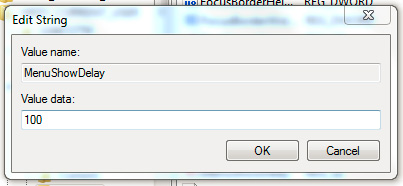
3. Tăng tốc Menu:

Khá đơn giản và dễ dàng, nếu muốn tăng tốc độ hiển thị của Menu, các bạn hãy tìm tới đường dẫn sau trong Registry:
HKEY_CURRENT_USER > Control Panel > Desktop
Tìm khóa MenuShowDelay tại đây, kích đúp vào khóa đó để thay đổi giá trị (mặc định là 400 millisecond)

4. Tránh việc khởi động lại:

Do 1 số nguyên nhân, ví dụ như sau khi cài đặt phần mềm, tùy chỉnh các phần khác trong Windows... hệ thống sẽ yêu cầu bạn khởi động lại máy. Nếu không muốn mất thời gian vào việc này, các bạn hãy chỉnh sửa lại Registry theo cách sau.
Mở Registry Editor và tìm đến đường dẫn:
HKEY_LOCAL_MACHINE > SOFTWARE > Policies > Microsoft > Windows.
Tạo mới 1 khóa Key DWORD (32-bit) tại cửa sổ bên phải, và đặt tên là NoAutoRebootWithLoggedOnUsers. Kích đúp để mở khóa đó và thay đổi giá trị Value data thành 1, các thông số khác giữ nguyên. Nhấn OK và đóng Registry Editor lại.

5. Tắt bỏ các thông tin cảnh báo không cần thiết:

Trên thanh Taskbar của Windows Vista và 7, hoặc 1 số nơi khác thường xuyên hiện lên những thông báo khác thường, và có thể gây khó chịu đối với người sử dụng. Để tránh khỏi hiện tượng này, chúng ta sẽ mở Registry Editor và tìm tới đường dẫn:
HKEY_CURRENT_USER > Software > Microsoft > Windows > CurrentVersion > Explorer > Advanced
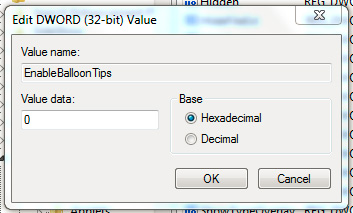
Tạo mới 1 khóa DWORD (32-bit) tại cửa sổ bên phải và đặt tên là EnableBalloonTips. Kích đúp và thay đổi giá trị Value data thành 0. Nhấn OK và đóng Registry Editor, sau đó Log off để áp dụng thay đổi.

6. Khởi động Windows XP nhanh hơn:

Hệ điều hành Windows XP của bạn khởi động quá chậm chạp, vì nhiều lý do khác nhau. Nhưng chúng ta vẫn có thể tạm thời rút ngắn khoảng thời gian này bằng cách chỉnh sửa Registry, qua đường dẫn:
HKEY_LOCAL_MACHINE > SYSTEM > CurrentControlSet > Control > ContentIndex
Tại cửa sổ bên phải, các bạn sẽ nhìn thấy khóa StartupDelay, kích đúp để mở khóa đó, thay đổi từ Hexadecimal thành Decimal, và điền thông số 40,000 (mặc định là 480,000). Nhấn OK, đóng cửa sổ Registry Editor và khởi động lại máy tính để áp dụng sự thay đổi.

Theo QTM

Related Posts Plugin for WordPress, Blogger...