SOFTWARE

Phần mềm và các vấn đề liên quan

HARDWARE

Cập nhật driver , những kiến thức về phần cứng

EBOOKS

Những cuốn sách hay , tài liệu tham khảo

GAMES

Game và thông tin về game

VIDEO

Những bộ phim , video hay được cập nhật

MUSIC

Thế giới âm nhạc

GRAPHIC

Đồ họa cơ bản đến nâng cao

MOBILE - PDA

Thế giới di động và các tiện ích

Showing posts with label Run. Show all posts

Tuesday, August 23, 2011

Run | Window + R


Acessibility Options
access.cpl

Add Hardware Wizard
hdwwiz.cpl

Add/Remove Programs
appwiz.cpl

Administrative Tools
control admintools

Automatic Updates
wuaucpl.cpl

Bluetooth Transfer Wizard
fsquirt

Calculator
calc

Certificate Manager
certmgr.msc

Character Map
charmap

Check Disk Utility
chkdsk

Clipboard Viewer
clipbrd

Command Prompt
cmd

Component Services
dcomcnfg

Computer Management
compmgmt.msc

Date and Time Properties
timedate.cpl

DDE Shares
ddeshare

Device Manager
devmgmt.msc

Direct X Control Panel (If Installed)*
directx.cpl

Direct X Troubleshooter
dxdiag

Disk Cleanup Utility
cleanmgr

Disk Defragment
dfrg.msc

Disk Management
diskmgmt.msc

Disk Partition Manager
diskpart

Display Properties
control desktop

Display Properties
desk.cpl

Display Properties (w/Appearance Tab Preselected)
control color

Dr. Watson System Troubleshooting Utility
drwtsn32

Driver Verifier Utility
verifier

Event Viewer
eventvwr.msc

File Signature Verification Tool
sigverif

Findfast
findfast.cpl

Folders Properties
control folders

Fonts
control fonts

Fonts Folder
fonts

Free Cell Card Game
freecell

Game Controllers
joy.cpl

Group Policy Editor (XP Prof)
gpedit.msc

Hearts Card Game
mshearts

Iexpress Wizard
iexpress

Indexing Service
ciadv.msc

Internet Properties
inetcpl.cpl

IP Configuration (Display Connection Configuration)
ipconfig /all

IP Configuration (Display DNS Cache Contents)
ipconfig /displaydns

IP Configuration (Delete DNS Cache Contents)
ipconfig /flushdns

IP Configuration (Release All Connections)
ipconfig /release

IP Configuration (Renew All Connections)
ipconfig /renew

IP Configuration (Refreshes DHCP & Re-Registers DNS)
ipconfig /registerdns

IP Configuration (Display DHCP Class ID)
ipconfig /showclassid

IP Configuration (Modifies DHCP Class ID)
ipconfig /setclassid

ava Control Panel (If Installed)
jpicpl32.cpl

Java Control Panel (If Installed)
javaws

Keyboard Properties
control keyboard

Local Security Settings
secpol.msc

Local Users and Groups
lusrmgr.msc

Logs You Out Of Windows
logoff

Microsoft Chat
winchat

Minesweeper Game
winmine

Mouse Properties
control mouse

Mouse Properties
main.cpl

Network Connections
control netconnections

Network Connections
ncpa.cpl

Network Setup Wizard
netsetup.cpl

Notepad
notepad

Nview Desktop Manager (If Installed)
nvtuicpl.cpl

Object Packager
packager

ODBC Data Source Administrator
odbccp32.cpl

On Screen Keyboard
osk

Opens AC3 Filter (If Installed)
ac3filter.cpl

Password Properties
password.cpl

Performance Monitor
perfmon.msc

Performance Monitor
perfmon

Phone and Modem Options
telephon.cpl

Power Configuration
powercfg.cpl

Printers and Faxes
control printers

Printers Folder
printers

Private Character Editor
eudcedit

Quicktime (If Installed)
QuickTime.cpl

Regional Settings
intl.cpl

Registry Editor
regedit

Registry Editor
regedit32

emote Desktop
mstsc

Removable Storage
ntmsmgr.msc

Removable Storage Operator Requests
ntmsoprq.msc

Resultant Set of Policy (XP Prof)
rsop.msc

Scanners and Cameras
sticpl.cpl

Scheduled Tasks
control schedtasks

Security Center
wscui.cpl

Services
services.msc

Shared Folders
fsmgmt.msc

Shuts Down Windows
shutdown

Sounds and Audio
mmsys.cpl

Spider Solitare Card Game
spider

SQL Client Configuration
cliconfg

System Configuration Editor
sysedit

System Configuration Utility
msconfig

System File Checker Utility (Scan Immediately)
sfc /scannow

System File Checker Utility (Scan Once At Next Boot)
sfc /scanonce

System File Checker Utility (Scan On Every Boot)
sfc /scanboot

System File Checker Utility (Return to Default Setting)
sfc /revert

System File Checker Utility (Purge File Cache)
sfc /purgecache

System File Checker Utility (Set Cache Size to size x)
sfc /cachesize=x

System Properties
sysdm.cpl

Task Manager
taskmgr

Telnet Client
telnet

User Account Management
nusrmgr.cpl

Utility Manager
utilman

Windows Firewall
firewall.cpl

Windows Magnifier
magnify

Windows Management Infrastructure
wmimgmt.msc

Windows System Security Tool
syskey

Windows Update Launches
wupdmgr

Windows XP Tour Wizard
tourstart

Wordpad
write or wordpad

Monday, February 14, 2011

Các lệnh chạy ứng dụng có sẵn trong Windows

Để truy cập nhanh đến một ứng dụng, một tiện ích, một chức năng, hay một công cụ nào đó trong Windows thì có lẽ bạn thường chọn giải pháp tạo Shortcut trên màn hình Desktop, nhưng nếu làm như vậy thì cái Desktop của bạn làm sao chứa hết và nhìn rất lộn xộn. Một giải pháp khác dành cho người dùng là họ có thể sử dụng các lệnh tắt để chạy ứng dụng từ hộp lệnh Run có sẵn trong Windows. Dưới đây là tổng hợp các lệnh phổ biến nhất có liên quan đến công việc hàng ngày của bạn.
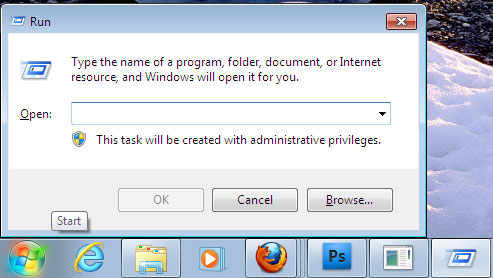
Để mở cửa sổ Run: Đối với Windows XP bạn có thể kích hoạt nó từ nút Start
Đối với Windows 7 bạn có thể sử dụng tổ phím Windows+R để kích hoạt nó
Các lệnh chạy ứng dụng có sẵn trong Windows
Một số môi trường cơ bản:
Một số lệnh tắt sau đây sẽ giúp bạn mở các thư mục thông dụng trong Windows.
%ALLUSERSPROFlLE%: Mở tất cả các Profile người dùng
%HomeDrive%: Mở ổ đĩa hệ thống
%UserProfile%: Mở Profile của bạn
%temp%: Mở thư mục chứa files tạm
%systemroot%: Mở thư mục Windows
Các lệnh phổ biến:
access.cpl: Cửa sổ thiết lập Accessibility (Windows XP)
hdwwiz.cpl: Trình quản lý thiết bị Divice Manager
appwiz.cpl: Cửa sổ quản lý cài đặt và gỡ bỏ chương trình “Add/ Remove Programs”
control admintools: Các công cụ quản trị hệ thống “ Administrative Tools”
wuaucpl.cpl: Cửa sổ cập nhật tự động “Automatic Updates”
calc: Máy tính
fsquirt: Trình quản lý Bluetooth (nếu có)
certmgr.msc: Quản lý các chứng chỉ trong Windows “Certificate Manager”
charmap: Bản đồ các ký tự đặc biệt “Character Map”
chkdsk: Kiểm tra đĩa cứng “Check Disk”
clipbrd: Xem các bản ghi Clipboard
cmd: Cửa sổ lệnh Command Prompt
dcomcnfg: Các dịch vụ Component của máy tính
compmgmt.msc: Cửa sổ quản lý Computer Management
control panel: Cửa sổ Cotrol Panel
timedate.cpl: Cấu hình ngày giờ hệ thống
devmgmt.msc: Quản lý thiết bị Device Manager
dxdiag: Công cụ hiển thị cấu hình hệ thống và phiên bản DirectX Diagnostic
cleanmgr: Tiện ích dọn dẹp đĩa “Disk Cleanup”
dfrg.msc: Trình chống phân mảnh ổ đĩa “Disk Defragment”
diskmgmt.msc: Trình quản lý đĩa cứng “Disk Management”
diskpart: Quản lý các phân vùng đĩa cứng
control desktop: Các thuộc tính Desktop
desk.cpl: Cài đặt màn hình hiển thị
control folders: Cài đặt thuộc tính Folders
control fonts: Quản lý Fonts
fonts: Quản lý Fonts
freecell: Chơi game “Free Cell Card”
joy.cpl: Quản lý Game Controllers
gpedit.msc: Cửa sổ thiết lập “Group Policy Editor”
mshearts: Chơi game “Hearts Card”
inetcpl.cpl: Cài đặt và cấu hình các thuộc tính Internet
Iexplore: Kích hoạt trình duyệt Internet Explorer
control keyboard: Thiết lập thuộc tính của bàn phím
secpol.msc: Cửa sổ quản lý Local Security Policy
lusrmgr.msc: Cửa sổ quản lý Local Users and Groups
control mouse: Thiết lập thuộc tính của chuột
ncpa.cpl: Cấu hình kết nối mạng
perfmon.msc: Thực thi màn hình “Performance Monitor”
telephon.cpl: Cửa sổ thiết lập “Phone and Modem Options”
powercfg.cpl: Quản lý nguồn
control printers: Cửa sổ quản lý “Printers and Faxes”
eudcedit: Trình biên tập ký tự riêng “Private Character Editor”
intl.cpl: Xác lập miền “Regional Settings”
regedit: Trình chỉnh sửa hệ thống Registry Editor
mstsc: Điều khiển máy tính từ xa “Remote Desktop”
wscui.cpl: Trung tâm bảo mật hệ thống “Sicurity Center”
services.msc: Các dịch vụ của hệ điều hành
fsmgmt.ms: Quản lý các thư mục chia sẻ “Shared Folders”
shutdown: Tắt máy tính
mmsys.cpl: Trình quản lý âm thanh “Sound and audio”
cliconfg: Cấu hình SQL Client
msconfig: Tiện ích cấu hình hệ thống “System Configuration Utility”
sfc /scannow: Scan các file hệ thống
sysdm.cpl: Thuộc tính hệ thống
Taskmgr: Trình quản lý “Task Manager”
nusrmgr.cpl: Trình quản lý các tài khoản người dùng“User Account Management”
firewall.cpl: Tường lửa
syskey: Công cụ bảo mật hệ thống
wupdmgr: Kích hoạt “Windows Update”
winver: Xem phiên bản của hệ điều hành
Write: Mở trình soạn thảo văn bản Wordpad.

Related Posts Plugin for WordPress, Blogger...